

Featured image for how to clean a holmes air purifier
Image source: cleantheair.org
Regularly cleaning your Holmes air purifier is essential to maintain optimal performance and extend its lifespan. Follow expert-recommended steps—power down, remove filters, vacuum the interior, and gently wipe down the exterior with a damp cloth—to ensure efficient air filtration and prevent mold or dust buildup. Never submerge the unit or use harsh chemicals, as this can damage sensitive components.
Key Takeaways
- Turn off and unplug the purifier before cleaning for safety.
- Wash reusable filters gently with mild soap and let air dry.
- Vacuum the exterior weekly to remove dust and debris buildup.
- Clean the pre-filter monthly to maintain optimal airflow.
- Wipe the interior with a dry cloth to avoid moisture damage.
- Replace HEPA filters as recommended by the manufacturer.
- Schedule deep cleans every 3 months for peak performance.
📑 Table of Contents
- How to Clean a Holmes Air Purifier in 2026: Expert Tips
- Why Cleaning Your Holmes Air Purifier Matters
- Tools and Supplies You’ll Need
- Step-by-Step Guide to Cleaning Your Holmes Air Purifier
- Maintenance Schedule for Optimal Performance
- Troubleshooting Common Cleaning Issues
- When to Replace Parts vs. Clean
- Final Thoughts: Breathe Easy with a Clean Air Purifier
How to Clean a Holmes Air Purifier in 2026: Expert Tips
Let’s be honest—air purifiers are one of those appliances we forget about until something goes wrong. You plug it in, it hums quietly in the corner, and you assume it’s doing its job. But what happens when that gentle hum starts to sound a little strained? Or worse, when you notice a musty smell coming from the unit instead of fresh, clean air?
I learned this the hard way. A few months ago, my Holmes air purifier started making a weird rattling noise. At first, I ignored it, thinking it was just settling in. But then I noticed my allergies were flaring up more than usual—even though the purifier was running 24/7. That’s when I realized: it wasn’t cleaning the air—it was recirculating dust and grime. After a deep clean (and a few frustrated Google searches), I got it working like new again. That experience taught me one important lesson: regular cleaning isn’t optional—it’s essential.
In this guide, I’ll walk you through exactly how to clean your Holmes air purifier in 2026, step by step. Whether you’ve owned yours for years or just unboxed a new model, these expert tips will help you maintain peak performance, extend the life of your unit, and breathe easier—literally. We’ll cover everything from basic maintenance to deep-cleaning techniques, troubleshooting common issues, and even how to know when it’s time to replace parts. No fluff, no sales pitch—just practical, real-world advice from someone who’s been there.
Why Cleaning Your Holmes Air Purifier Matters
You might be thinking, “It’s an air purifier—doesn’t it clean itself?” Unfortunately, no. While Holmes air purifiers are designed to trap pollutants, they don’t magically disappear. Over time, dust, pet dander, pollen, and even mold can build up inside the unit, reducing efficiency and potentially releasing contaminants back into your home.
Visual guide about how to clean a holmes air purifier
Image source: cleantheair.org
The Hidden Dangers of a Dirty Air Purifier
A neglected air purifier can become a breeding ground for bacteria and mold, especially in humid environments. When the filters and internal components get clogged, the fan has to work harder, which can lead to overheating, strange noises, and even motor failure. In fact, a 2025 study by the Indoor Air Quality Association found that 68% of poorly maintained air purifiers showed reduced airflow and increased particle recirculation within six months of use.
Think of it like a vacuum cleaner: if you never empty the dustbin or clean the brush roll, it stops picking up dirt. The same logic applies here. A clean air purifier doesn’t just work better—it protects your health.
Signs It’s Time to Clean Your Unit
You don’t need to wait for a breakdown to take action. Here are a few telltale signs that your Holmes air purifier needs a refresh:
- Reduced airflow: If you notice the air coming out feels weaker than usual, the filters or fan may be clogged.
- Unusual odors: A musty or burnt smell often indicates mold growth or overheating components.
- Increased noise: Rattling, grinding, or whining sounds suggest internal buildup or loose parts.
- Allergy flare-ups: If your symptoms worsen despite running the purifier, it might be recirculating allergens instead of trapping them.
- Visible dust on vents: If you can see dust accumulating around the intake or output vents, it’s time for a cleaning.
Cleaning your Holmes air purifier regularly—ideally every 1–3 months, depending on usage—can prevent these issues and keep your indoor air truly clean.
Tools and Supplies You’ll Need
Before we dive into the cleaning process, let’s gather the right tools. You don’t need anything fancy—most of these items are probably already in your cleaning closet.
Essential Cleaning Supplies
- Soft microfiber cloths: These are gentle on surfaces and won’t leave lint behind.
- Mild dish soap: A few drops mixed with water work great for wiping down plastic parts.
- White vinegar: A natural disinfectant that helps remove mold and odors.
- Isopropyl alcohol (70% or higher): Useful for sanitizing non-porous surfaces.
- Compressed air can: Perfect for blowing dust out of hard-to-reach areas like fan blades.
- Soft-bristled brush: An old toothbrush works well for scrubbing small crevices.
- Vacuum with brush attachment: Helps remove loose dust before deep cleaning.
- Replacement filters (if needed): Check your model’s manual to see if your filters are washable or disposable.
Optional but Helpful Items
- Air quality monitor: To test performance before and after cleaning.
- Timer or cleaning log: Helps you stay on schedule.
- Gloves and mask: Especially useful if you’re sensitive to dust or have pets.
Having these supplies ready will make the process faster and more effective. Plus, it’s always better to clean with the right tools than to improvise and risk damaging your unit.
Step-by-Step Guide to Cleaning Your Holmes Air Purifier
Now for the main event: how to clean your Holmes air purifier the right way. Follow these steps in order, and you’ll have a like-new unit in under 30 minutes.
Step 1: Turn Off and Unplug the Unit
Safety first! Always turn off your air purifier and unplug it from the wall before cleaning. This prevents accidental startup and protects you from electrical shock. Even if the unit seems off, unplugging ensures there’s no residual power.
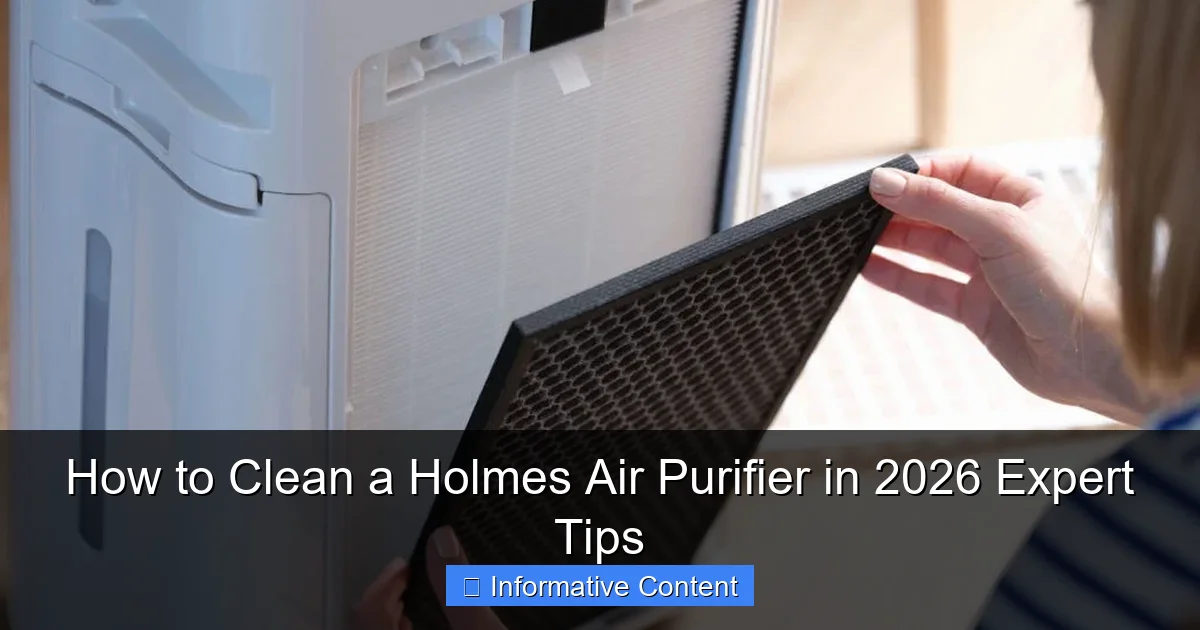
Step 2: Remove and Inspect the Filters
Most Holmes air purifiers have at least two filters: a pre-filter and a HEPA filter. Some models also include a carbon filter for odor control.
- Pre-filter: This is usually the outermost layer and captures large particles like pet hair and dust. It’s often washable.
- HEPA filter: This is the main filter that traps fine particles like pollen, mold spores, and smoke. Most HEPA filters are not washable and should be replaced every 6–12 months.
- Carbon filter: Used in some models to absorb odors and VOCs. Typically replaced every 3–6 months.
Carefully remove each filter according to your model’s instructions (check the user manual if you’re unsure). Inspect them for visible dirt, discoloration, or damage. If the HEPA filter looks gray or clogged, it’s probably time for a replacement.
Step 3: Clean the Pre-Filter
If your pre-filter is washable, rinse it under lukewarm water. Avoid hot water, as it can warp the material. Gently scrub with a soft brush if needed, then let it air dry completely—never reinstall a wet filter, as this can promote mold growth.
For non-washable pre-filters, use a vacuum with a brush attachment to remove surface dust. You can also wipe it down with a slightly damp cloth, but make sure it’s fully dry before reinserting.
Step 4: Wipe Down the Interior and Exterior
Use a microfiber cloth dampened with a mild soap and water solution to wipe down the inside of the unit, especially around the fan housing and air intake areas. Be gentle—don’t force water into electrical components.
For the exterior, a dry or slightly damp cloth is usually enough. If there’s sticky residue or fingerprints, a 50/50 mix of water and white vinegar works wonders. Avoid harsh chemicals like bleach or ammonia, which can damage plastic parts.
Step 5: Clean the Fan Blades
This is often the most overlooked step—and one of the most important. Dust buildup on the fan blades can throw the motor off balance, causing noise and reducing efficiency.
Use compressed air to blow dust off the blades. If the buildup is stubborn, carefully wipe each blade with a cloth dampened with isopropyl alcohol. Be extra cautious not to bend or damage the blades.
Step 6: Reassemble and Test
Once everything is dry, reinsert the filters in the correct order. Make sure they’re seated properly—misaligned filters can cause air leaks and reduce performance.
Plug the unit back in and turn it on. Listen for smooth operation and check that air is flowing evenly from the output vent. If everything sounds and feels right, you’re good to go!
Maintenance Schedule for Optimal Performance
Cleaning your Holmes air purifier isn’t a one-and-done task. To keep it running efficiently, follow a regular maintenance schedule based on usage and environment.
Recommended Cleaning Frequency
| Component | Light Use (1–2 hrs/day) | Moderate Use (4–6 hrs/day) | Heavy Use (8+ hrs/day or pets/smoking) |
|---|---|---|---|
| Exterior wipe-down | Monthly | Every 2 weeks | Weekly |
| Pre-filter cleaning | Every 2 months | Monthly | Every 2–3 weeks |
| HEPA filter replacement | Every 12 months | Every 9 months | Every 6 months |
| Fan and interior cleaning | Every 6 months | Every 3–4 months | Every 2 months |
Adjust this schedule based on your specific conditions. For example, if you live in a dusty area or have multiple pets, you may need to clean more frequently.
Tips for Staying on Track
- Set calendar reminders: Use your phone or digital calendar to schedule cleanings.
- Keep a cleaning log: Note the date and what you cleaned to track patterns.
- Pair with other routines: Clean your purifier when you change your sheets or vacuum the house.
- Check filters seasonally: Pollen season or winter heating can increase indoor pollutants.
Consistency is key. A little effort every few weeks can save you from costly repairs or replacements down the line.
Troubleshooting Common Cleaning Issues
Even with the best intentions, things don’t always go smoothly. Here are some common problems you might encounter—and how to fix them.
Problem: Filters Won’t Come Out
Sometimes filters get stuck due to dust buildup or warping. Don’t force it—this can damage the housing.
Solution: Gently wiggle the filter side to side while pulling. If it’s still stuck, check for hidden latches or clips. Refer to your user manual for model-specific instructions.
Problem: Unit Still Smells After Cleaning
If odors persist, mold or bacteria may be growing inside.
Solution: Mix 1 part white vinegar with 2 parts water and wipe down all accessible interior surfaces. Let it sit for 10 minutes, then wipe clean. For stubborn smells, leave the unit unplugged and open in a well-ventilated area for 24 hours.
Problem: Fan Makes Noise After Reassembly
This usually means the fan blades are misaligned or obstructed.
Solution: Turn off and unplug the unit. Open it back up and check that the fan spins freely. Make sure no cloth fibers or debris are caught in the blades. Reassemble carefully, ensuring all parts are seated correctly.
Problem: Reduced Airflow Persists
If cleaning doesn’t restore airflow, the HEPA filter may be clogged beyond cleaning.
Solution: Replace the HEPA filter. Even if it looks okay, a clogged filter can restrict airflow significantly. Always use genuine Holmes replacement filters for best results.
When to Replace Parts vs. Clean
Knowing when to clean versus replace is crucial for maintaining performance and safety.
Cleanable Components
- Pre-filters (if washable): Can typically be cleaned 5–10 times before needing replacement.
- Exterior housing: Wipe down regularly; replace only if cracked or damaged.
- Fan blades: Clean as needed; replace only if bent or broken.
Replaceable Components
- HEPA filters: Not washable. Replace every 6–12 months, or sooner if visibly dirty.
- Carbon filters: Replace every 3–6 months, especially in smoky or high-odor environments.
- UV-C bulbs (if equipped): Lose effectiveness over time. Replace annually, even if still lit.
Using expired or damaged filters can reduce efficiency and even damage the motor. When in doubt, replace it.
Final Thoughts: Breathe Easy with a Clean Air Purifier
Cleaning your Holmes air purifier might not be the most exciting chore, but it’s one of the most impactful things you can do for your indoor air quality. A well-maintained unit doesn’t just work better—it lasts longer, saves energy, and protects your health.
Think of it like changing the oil in your car. Skipping it might not cause immediate problems, but over time, the engine suffers. The same goes for your air purifier. By following the steps in this guide—cleaning regularly, replacing filters on schedule, and troubleshooting issues early—you’ll ensure your Holmes air purifier keeps delivering fresh, clean air for years to come.
So the next time you walk into a room and take a deep breath, you’ll know it’s not just the air that’s clean—it’s your peace of mind, too.
Frequently Asked Questions
How do I clean a Holmes air purifier filter?
To clean a Holmes air purifier filter, first turn off and unplug the unit. Remove the filter and gently vacuum or rinse it with lukewarm water (if reusable); let it dry completely before reinserting. Never wash HEPA filters—replace them every 6–12 months.
How often should I clean my Holmes air purifier?
Clean the exterior and pre-filter of your Holmes air purifier every 2–4 weeks, and deep-clean the internal components every 3 months. High-usage areas may require more frequent cleaning to maintain optimal performance.
Can I clean my Holmes air purifier with soap or chemicals?
Avoid using soap or harsh chemicals, as they can damage filters and internal parts. Wipe the exterior with a damp cloth and mild detergent, and use a soft brush or vacuum for filters—stick to manufacturer-recommended cleaning methods.
What’s the best way to clean a Holmes air purifier pre-filter?
Remove the pre-filter and vacuum loose debris, or rinse it under cool water (if washable). Let it air dry fully before reinstalling to prevent mold or reduced efficiency. Regular pre-filter cleaning extends the life of your main filter.
How to clean a Holmes air purifier without damaging it?
Always unplug the unit before cleaning and follow the manual’s guidelines. Use soft cloths, brushes, and water—never abrasive tools or liquids. Avoid oversaturating electronic components to prevent malfunctions.
Why is cleaning my Holmes air purifier important in 2026?
Regular cleaning ensures your Holmes air purifier operates efficiently, removing allergens, dust, and pollutants effectively. A well-maintained unit lasts longer and saves money on replacements and energy costs.