
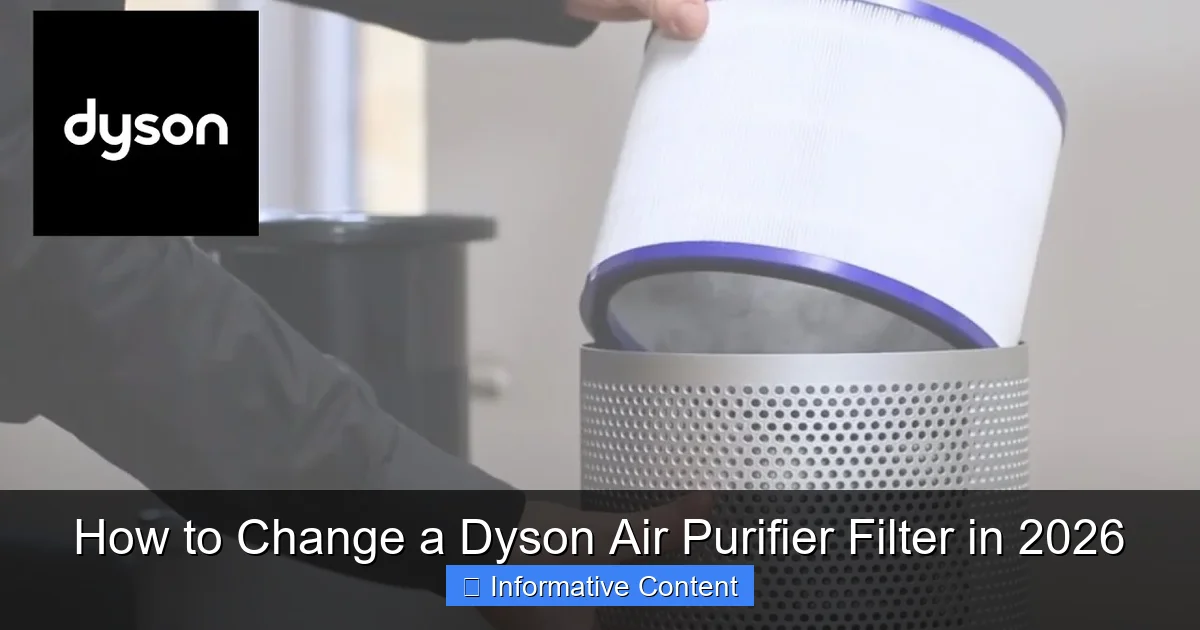
Featured image for how to change a dyson air purifier filter
Image source: i.ytimg.com
Changing your Dyson air purifier filter in 2026 is quick, easy, and essential for maintaining peak performance. Simply turn off and unplug the unit, remove the old filter from the base, and replace it with a genuine Dyson replacement—ensuring a secure fit for optimal air filtration. Regular filter changes every 6–12 months keep your purifier running efficiently and your indoor air clean.
Key Takeaways
- Check filter status regularly: Use the Dyson app or machine display to monitor filter life.
- Turn off and unplug the unit: Always ensure safety before starting the filter replacement process.
- Locate the filter compartment: Open the front or side panel depending on your Dyson model.
- Remove old filter carefully: Pull straight out to avoid damaging internal components.
- Install the new filter correctly: Align arrows and ensure a secure, snug fit.
- Reset filter life indicator: Use the app or controls to restart the countdown.
- Replace filters every 6–12 months: Frequency depends on usage and air quality.
📑 Table of Contents
- Why Changing Your Dyson Air Purifier Filter Matters
- Know Your Dyson Air Purifier Model and Filter Type
- When to Change Your Dyson Air Purifier Filter
- Step-by-Step Guide: How to Change a Dyson Air Purifier Filter
- Maintaining Your Dyson Air Purifier Between Filter Changes
- Cost, Longevity, and Environmental Considerations
- Final Thoughts: Breathe Easy in 2026
Why Changing Your Dyson Air Purifier Filter Matters
Let’s be honest: air purifiers are one of those appliances we set and forget. We plug them in, press “Auto,” and assume they’ll hum away silently, cleaning our air without needing a second thought. I did that for years with my Dyson Pure Cool TP04. It sat in the corner of my living room, quietly doing its job—until one day, I noticed the air smelled… off. Not terrible, but stale. Like a forgotten gym bag. After some investigation (and a few sneezes), I realized it had been over a year since I last changed the filter. That’s when it hit me: your Dyson air purifier is only as good as its filter, and if you’re not changing it on time, you’re basically breathing in yesterday’s dust, pollen, and pet dander.
Changing your Dyson air purifier filter isn’t just about maintenance—it’s about health, efficiency, and getting your money’s worth. A clogged filter forces the purifier to work harder, which means higher energy use, louder operation, and reduced air quality. In 2026, with rising concerns about indoor air pollution and airborne viruses, keeping your purifier in top shape is more important than ever. The good news? It’s surprisingly easy. Whether you own a Dyson Pure Cool, Pure Humidify+Cool, or the newer Pure Hot+Cool models, the process is simple, takes under 10 minutes, and can make a world of difference. Let’s walk through exactly how to change a Dyson air purifier filter—step by step, with real-world tips and no confusing jargon.
Know Your Dyson Air Purifier Model and Filter Type
Not all Dyson air purifiers are the same, and neither are their filters. The first step in changing your filter is knowing which filter you need. Using the wrong one—or worse, a third-party knockoff—can reduce performance, void your warranty, and even damage your machine. Dyson uses a few different filter systems depending on the model, so let’s break it down.
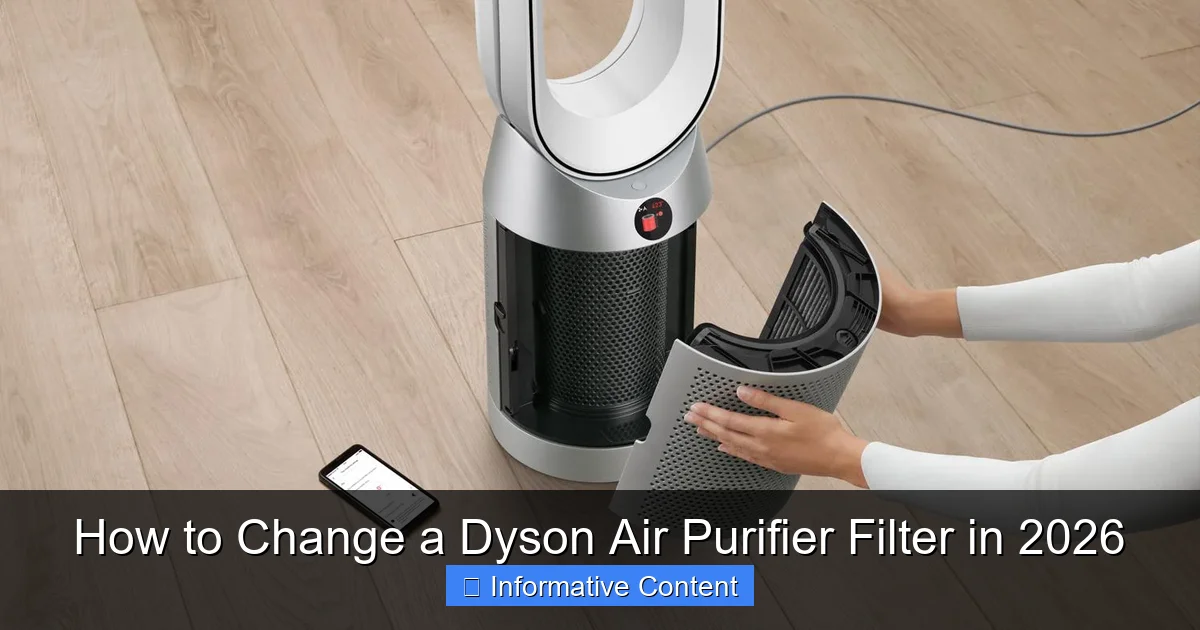
Visual guide about how to change a dyson air purifier filter
Image source: dyson-h.assetsadobe2.com
Identifying Your Dyson Model
Most Dyson air purifiers have the model number printed on the base or back of the unit. Common models include:
- Dyson Pure Cool TP04/TP07 – Tower fan with HEPA and activated carbon filters
- Dyson Pure Cool TP01/TP02 – Older models with similar setup
- Dyson Pure Humidify+Cool PH01/PH03 – Includes humidification and dual filters
- Dyson Pure Hot+Cool HP04/HP07 – Adds heating function
- Dyson Purifier Cool TP07 (2026 update) – Latest model with improved filtration and app integration
If you’re unsure, check the user manual or log into the Dyson app. The app usually identifies your model automatically and can even track filter life—more on that later.
Understanding the Two Main Filter Types
Most Dyson purifiers use a dual-filter system:
- HEPA Filter (High-Efficiency Particulate Air) – Captures 99.97% of particles as small as 0.3 microns, including dust, pollen, mold spores, and pet dander.
- Activated Carbon Filter – Absorbs odors, VOCs (volatile organic compounds), smoke, and gases. Think cooking smells, pet odors, or that weird “new furniture” scent.
Some models, like the PH03, have a combined HEPA+Carbon filter, while others keep them separate. The TP07, for example, uses a single 360° Glass HEPA + Activated Carbon filter that wraps around the entire base—this makes replacement easier but requires careful handling.
Why Genuine Dyson Filters Are Worth It
I once tried a third-party filter to save $20. Big mistake. It didn’t seal properly, let dust sneak through, and the purifier started making a rattling noise. Dyson’s filters are designed to fit perfectly, with precise seals and airflow channels. They also include a smart chip that communicates with the purifier, so the machine knows when a filter is new or needs replacing. Knockoffs lack this chip, so your purifier might keep showing “Filter OK” even when it’s clogged. Save yourself the hassle: stick with genuine Dyson filters. They cost more (usually $70–$90 for a set), but you’ll get better performance, longer life, and peace of mind.
When to Change Your Dyson Air Purifier Filter
Here’s the million-dollar question: When should you change your filter? Dyson claims filters last about 12 months with 12 hours of daily use. But that’s a rough estimate. In reality, filter life depends on your environment, usage, and air quality. Let’s look at the signs it’s time for a change.
Signs Your Filter Needs Replacing
Your purifier will often tell you—if you know how to listen:
- Reduced airflow – The fan is on, but the breeze feels weaker.
- Unusual odors – If your purifier starts smelling like old smoke, pets, or chemicals, the carbon filter is saturated.
- Increased noise – A clogged filter forces the fan to work harder, leading to louder operation.
- Visible dirt or discoloration – Open the filter compartment and take a look. If the HEPA filter is gray or black instead of white, it’s time.
- App notification – Dyson’s app (available for most 2020+ models) tracks filter life and sends alerts when it’s time to replace.
I learned this the hard way. After moving into a house with hardwood floors (hello, dust!), my filter lasted only 8 months. The app didn’t notify me—I had to manually check. Now, I set a calendar reminder every 6 months to inspect the filter, even if the app says it’s fine.
How Usage and Environment Affect Filter Life
Your filter doesn’t age like a battery—it ages like a sponge. The more pollutants it absorbs, the faster it fills up. Consider these factors:
- Urban vs. rural – City dwellers with traffic, construction, or wildfire smoke may need to change filters every 6–8 months.
- Pets – Cat and dog owners, especially with long-haired breeds, should expect faster clogging. Shedding season? Check monthly.
- Smoking or cooking – Smoke and grease particles overload the carbon filter quickly.
- Allergies – If you’re sensitive to pollen or mold, a fresh filter can make a noticeable difference.
Pro tip: If you run your purifier 24/7 during allergy season, consider changing the filter every 4–6 months. It’s better to replace it early than to breathe in unfiltered air.
The “Filter Life” Indicator: Friend or Foe?
Dyson’s built-in filter life indicator (on the app or machine display) is helpful, but it’s not perfect. It estimates based on average usage, not real-time air quality. I’ve had the indicator say “30% life left,” only to open the filter and find it completely black. Use the indicator as a guide, but inspect the filter physically every 3–4 months. It takes two minutes and could save you from breathing in dirty air.
Step-by-Step Guide: How to Change a Dyson Air Purifier Filter
Now for the main event: the actual filter change. Don’t worry—it’s easier than changing a lightbulb. I’ll walk you through it using the Dyson Pure Cool TP04 (one of the most popular models), but the process is similar for most Dyson purifiers. Let’s do this.
Tools and Supplies You’ll Need
You don’t need any tools—just your hands and a clean workspace. Here’s what to have ready:
- Genuine Dyson replacement filter (HEPA + Carbon or combined)
- Vacuum with a brush attachment (optional, for cleaning)
- Soft, lint-free cloth (to wipe down the inside)
- Trash bag (for the old filter)
Pro tip: Do this near a trash can. Old filters can be dusty, and you don’t want to spread it around.
Step 1: Power Off and Unplug
Safety first. Turn off the purifier and unplug it from the wall. This prevents accidental activation and keeps you safe from moving parts. I once forgot this and nearly dropped the filter when the fan suddenly turned on. Not fun.
Step 2: Remove the Outer Casing
Most Dyson purifiers have a magnetic or snap-on base. For the TP04:
- Place the purifier on its side (on a soft surface like a towel).
- Press the two release buttons on the base (one on each side).
- Gently pull the outer casing away from the fan unit. It should come off easily.
For models with a 360° filter (like the TP07), the entire base unscrews or lifts off—check your manual for specifics.
Step 3: Remove the Old Filter(s)
Now you’ll see the filter(s). For the TP04:
- The HEPA filter is a white, accordion-folded sleeve around the base.
- The carbon filter is a flat, black sheet behind the HEPA.
- Grab the HEPA filter by the plastic frame and pull it straight out.
- Then remove the carbon filter.
For combined filters (like on the PH01), there’s just one piece to remove. Be gentle—the HEPA material is delicate and can tear if pulled too hard.
Step 4: Clean the Interior
While the filter is out, take a moment to clean the inside:
- Use a vacuum with a brush attachment to remove dust from the fan blades and interior walls.
- Wipe down the inside with a slightly damp cloth. Avoid getting water near electrical components.
- Let it air dry for 5–10 minutes before reassembling.
This step isn’t mandatory, but it helps the new filter work more efficiently. I do this every time—it takes an extra 3 minutes and makes a difference.
Step 5: Install the New Filter(s)
Time to put in the fresh filter:
- For the TP04: Slide the new HEPA filter in first (white side out), then the carbon filter (black side out). Make sure the arrows on the filter frame point upward.
- For combined filters: Insert the new filter with the Dyson logo facing out.
- Press down firmly around the edges to ensure a tight seal.
Important: Don’t force it. If it doesn’t slide in easily, double-check the orientation. A poor seal means unfiltered air can bypass the filter—defeating the whole purpose.
Step 6: Reassemble and Reset
Once the filter is in:
- Snap the outer casing back on (or screw it in, depending on the model).
- Plug the purifier back in.
- Reset the filter life counter: On the TP04, hold the “Filter” button for 5 seconds until it blinks. On newer models, use the Dyson app to “Reset Filter Life.”
That’s it! Your purifier should now show 100% filter life and start cleaning the air with fresh, efficient filters.
Maintaining Your Dyson Air Purifier Between Filter Changes
Changing the filter is just one part of the story. To keep your Dyson purifier running smoothly (and extend filter life), a little ongoing care goes a long way.
Regular Cleaning of the Exterior and Fan
Wipe down the outside of your purifier weekly with a soft, dry cloth. For the fan blades (which can collect dust), use a vacuum brush or a microfiber duster. Avoid harsh cleaners—they can damage the plastic or leave residues that affect airflow.
Checking for Airflow Obstructions
Make sure the intake and outlet grilles are clear. Don’t place the purifier in a corner or behind furniture—it needs at least 6 inches of space on all sides for proper airflow. I once had mine tucked behind a bookshelf, and the airflow dropped by 30%. Moving it to the center of the room fixed the issue instantly.
Using the Dyson App for Smart Maintenance
If your model is app-connected (TP04 and newer), use it! The Dyson app lets you:
- Track real-time air quality (PM2.5, VOCs, humidity).
- Monitor filter life and get replacement reminders.
- Control the purifier remotely (great for turning it on before you get home).
- Run diagnostics to check for issues.
I love the app’s “Air Quality History” feature. It shows spikes in pollution (like when I burned toast) and helps me adjust settings accordingly.
When to Clean (Not Replace) the Filter
Some Dyson models, like the Pure Humidify+Cool, have a washable pre-filter. Check your manual—you can rinse it under water every few weeks to remove large dust particles. This helps the main filter last longer. Just let it air dry completely before reinstalling.
Cost, Longevity, and Environmental Considerations
Let’s talk money and sustainability. Air purifier filters aren’t cheap, and replacing them regularly adds up. Here’s how to make it more manageable.
Cost of Genuine Dyson Filters
As of 2026, here’s what you can expect to pay:
| Model | Filter Type | Price (USD) | Expected Lifespan |
|---|---|---|---|
| TP04/TP07 | 360° Glass HEPA + Activated Carbon | $89.99 | 12 months (avg.) |
| PH01/PH03 | Combined HEPA+Carbon | $79.99 | 12 months (avg.) |
| HP04/HP07 | Dual HEPA + Carbon | $94.99 | 12 months (avg.) |
Pro tip: Buy filters in sets of two. Dyson often offers discounts, and you’ll have a backup when you need it.
Extending Filter Life Without Sacrificing Performance
You don’t have to replace the filter every time it looks a little dirty. Here’s how to stretch its life:
- Run the purifier on “Auto” mode. It adjusts fan speed based on air quality, reducing wear on the filter.
- Use it in a smaller room. Less air to filter = slower clogging.
- Keep windows and doors closed when the purifier is on. Less outdoor pollution means less work for the filter.
Recycling and Disposal
Dyson filters aren’t recyclable through regular municipal programs—they contain mixed materials (plastic, fiberglass, carbon). However, Dyson offers a free recycling program for used filters. Just pack them in the original box, print a label from their website, and drop it at a UPS store. It’s a small step, but it helps reduce landfill waste.
Final Thoughts: Breathe Easy in 2026
Changing your Dyson air purifier filter isn’t just a chore—it’s a small act of self-care. Every time I swap out an old, clogged filter, I notice the air feels lighter, fresher. My allergies improve. My home smells cleaner. And my purifier runs quieter, like it’s finally getting a break.
Remember: a clean filter means clean air. It’s that simple. Whether you’re dealing with city smog, pet hair, or seasonal allergies, your Dyson is only as good as its filter. Don’t wait for the app to nag you—inspect it every few months, change it when it’s dirty, and enjoy the peace of mind that comes with breathing easier.
In 2026, indoor air quality is more important than ever. We spend 90% of our time inside, and the air we breathe can affect our health, sleep, and even focus. By taking 10 minutes to change your filter, you’re not just maintaining a machine—you’re investing in your well-being. So go ahead, open that base, swap in that fresh filter, and take a deep, clean breath. You’ve earned it.
Frequently Asked Questions
How do I know when to change my Dyson air purifier filter?
Your Dyson air purifier will typically display a filter replacement alert on the LCD screen or app when it’s time for a change. Most filters last 6-12 months depending on usage and air quality, but the “how to change a Dyson air purifier filter” process is the same regardless of model.
Where is the filter located on my Dyson air purifier?
The filter compartment is usually at the base or back of the unit, secured with a twist-lock or magnetic cover. Check your model’s manual for exact placement, as newer 2026 Dyson models may feature redesigned access panels.
How to change a Dyson air purifier filter without damaging the unit?
Always power off and unplug the purifier before beginning. Gently twist or lift the filter cover (avoid forcing it), then slide out the old filter and replace it with a genuine Dyson filter for optimal performance.
Can I clean my Dyson filter instead of replacing it?
Only the pre-filter (if your model has one) can be vacuumed or rinsed—never submerge the HEPA or carbon filters. For true “how to change a Dyson air purifier filter” guidance, replacement is required for main filters to maintain air quality standards.
Do I need special tools to replace my Dyson air purifier filter?
No tools are required for any 2026 Dyson models. The process uses tool-free twist mechanisms or snap-on covers designed for user-friendly maintenance in under 2 minutes.
What happens if I don’t replace my Dyson air purifier filter?
Reduced airflow, louder operation, and diminished allergen removal will occur. The unit may also trigger persistent filter alerts until the “how to change a Dyson air purifier filter” process is completed with a new filter.