

Featured image for how to clean a fresh air purifier
Image source: thumbs.dreamstime.com
Regular cleaning is essential to maintain your fresh air purifier’s peak performance and extend its lifespan. In 2026, advancements in filter technology mean a simple monthly wipe-down of pre-filters and a thorough deep clean every 3-6 months can drastically improve air quality and energy efficiency. Follow manufacturer guidelines, use only recommended cleaning methods, and never operate the unit with a dirty or clogged filter to ensure optimal airflow and purification power.
Key Takeaways
- Unplug the unit before cleaning to ensure safety and prevent damage.
- Wipe the exterior weekly with a dry or slightly damp microfiber cloth.
- Vacuum pre-filters monthly to remove dust and extend filter life.
- Replace HEPA filters every 6–12 months or as recommended by the manufacturer.
- Clean internal sensors gently with a soft brush to maintain accurate air quality readings.
- Avoid water on electronics—use only dry or slightly damp cloths near internal parts.
- Reset filter indicators after cleaning or replacing filters to track usage accurately.
📑 Table of Contents
- Why Cleaning Your Fresh Air Purifier Matters
- Understanding Your Air Purifier: Know What You’re Cleaning
- Step-by-Step Guide: How to Clean a Fresh Air Purifier
- Cleaning Schedule: How Often Should You Clean?
- Common Mistakes and How to Avoid Them
- Advanced Tips for Maximum Efficiency in 2026
- Conclusion: Clean Air Starts with a Clean Purifier
Why Cleaning Your Fresh Air Purifier Matters
Let’s be honest—most of us bought a fresh air purifier because we wanted to breathe easier. Whether it’s pollen, pet dander, cooking smells, or just the musty air in a basement apartment, a good air purifier can be a game-changer. But here’s the thing: an air purifier only works as well as you maintain it. I learned this the hard way a few years ago when I noticed my once-fresh-smelling bedroom started to feel stuffy. The purifier was running nonstop, but the air didn’t feel any cleaner. After some digging, I realized the filters were clogged, and the internal fan was coated in dust. The purifier was basically recycling dirty air. That’s when I discovered the golden rule: clean your fresh air purifier regularly, or it stops being your ally and starts becoming a silent enemy.
In 2026, air purifier technology has evolved—smarter sensors, quieter fans, and even self-cleaning models. But even the most advanced units can’t escape the basic physics of air filtration: dust, allergens, and particles get trapped. And if you don’t clean them out, performance drops, energy use rises, and in some cases, mold or bacteria can start to grow inside. The good news? Cleaning your fresh air purifier isn’t rocket science. With a little know-how, the right tools, and a routine, you can keep your purifier running at peak efficiency, extend its lifespan, and actually enjoy the clean air you paid for. This guide walks you through exactly how to clean a fresh air purifier in 2026—step by step, with real-life tips and tricks I’ve gathered from years of testing, troubleshooting, and yes, occasionally forgetting to clean mine.
Understanding Your Air Purifier: Know What You’re Cleaning
Types of Air Purifiers and Their Components
Before you grab a microfiber cloth or vacuum, it helps to know what kind of air purifier you have. Not all models are built the same, and cleaning methods can vary. The most common types in 2026 include:
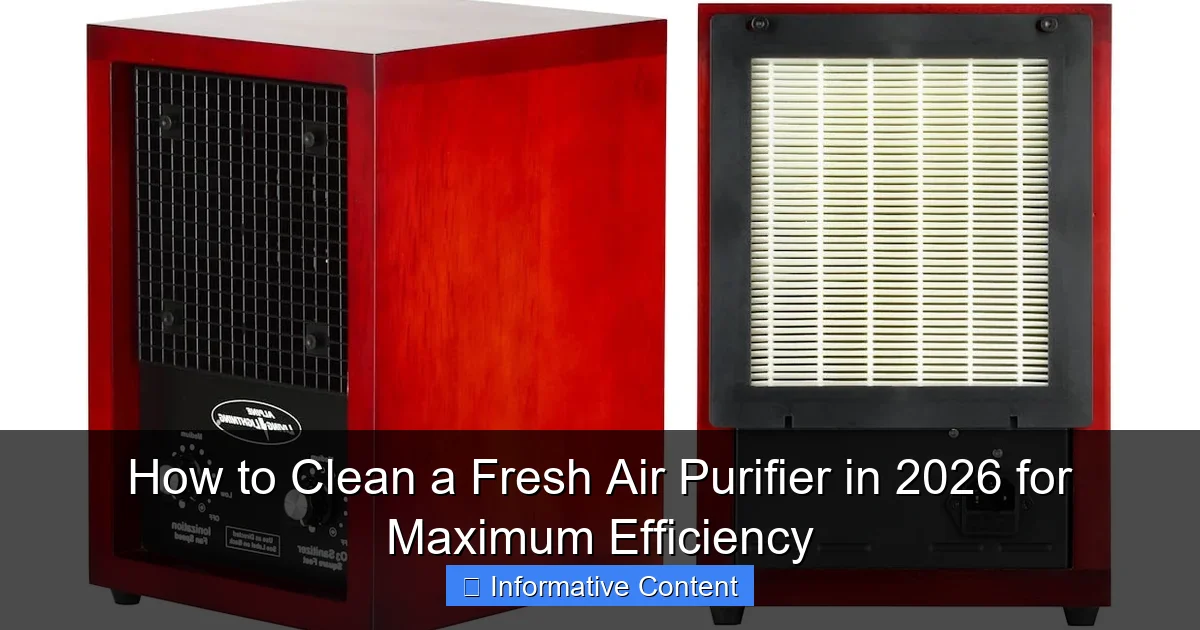
Visual guide about how to clean a fresh air purifier
Image source: alpineairpurifier.com
- HEPA Filter Purifiers: These use a High-Efficiency Particulate Air (HEPA) filter to trap 99.97% of particles as small as 0.3 microns. They’re the gold standard for allergy sufferers and homes with pets.
- Activated Carbon Filters: Often paired with HEPA filters, these absorb odors, smoke, and VOCs (volatile organic compounds) from cooking, cleaning products, or new furniture.
- UV-C Light Units: These use ultraviolet light to kill bacteria and viruses. Usually found in medical-grade or high-end models.
- Ionizers: Release charged particles to attract dust and allergens, causing them to fall out of the air. Some models combine this with a collection plate.
- Washable or Permanent Filters: Found in budget models or eco-conscious units. These can be rinsed and reused, but require more frequent attention.
Most fresh air purifiers in 2026 use a multi-stage system—like a pre-filter, HEPA filter, and carbon filter—so you’ll need to clean each stage appropriately. For example, I have a Coway Mighty, which uses a pre-filter, HEPA, and carbon. The pre-filter catches hair and large dust, the HEPA traps fine particles, and the carbon handles smells. Each requires different care.
Reading the Manual (Yes, Really)
I know, I know—reading the manual feels like homework. But trust me, it’s worth it. The manufacturer knows your purifier better than anyone. It will tell you:
- Which filters are washable vs. replaceable
- How often to clean each component
- Any special cleaning tools or methods (e.g., no water on electronic parts)
- Whether the unit has a filter replacement indicator or self-cleaning cycle
For example, my Blueair 411+ manual says the pre-filter can be vacuumed weekly and rinsed monthly, but the HEPA filter should never get wet. Meanwhile, my friend’s Levoit Core 300S has a washable pre-filter and a replaceable HEPA, but warns against using any cleaning sprays near the sensor. Skipping the manual can lead to costly mistakes—like ruining a $100 HEPA filter by washing it.
Signs Your Purifier Needs Cleaning
Don’t wait for the air to feel dirty. Watch for these red flags:
- Reduced airflow: The fan sounds louder, or you feel less air coming out.
- Unpleasant odors: A musty or burnt smell when running (common with clogged carbon filters).
- Dust buildup on vents: Even after vacuuming, dust reappears quickly around the unit.
- Filter indicator light: Many 2026 models have smart sensors that alert you when cleaning is due.
- Increased allergy symptoms: Sneezing, itchy eyes, or congestion returning despite running the purifier.
I once ignored the musty smell from my purifier for weeks, assuming it was just spring pollen. Turns out, the carbon filter was saturated with moisture and starting to mold. A deep clean fixed it, but it was a wake-up call: cleaning isn’t optional—it’s essential.
Step-by-Step Guide: How to Clean a Fresh Air Purifier
Step 1: Power Off and Unplug
Always start by turning off the purifier and unplugging it. Even if it has a “clean mode,” never clean a running unit. I learned this when I accidentally brushed the fan blade with a cloth—it was loud, scary, and could’ve damaged the motor. Safety first.
Step 2: Remove and Inspect Filters
Open the purifier’s housing (usually a side panel or front grill). Carefully remove each filter. Hold them up to the light:
- Pre-filter: Should look clean, not gray or fuzzy. If it’s dark or clogged, it needs cleaning.
- HEPA filter: Should be white or off-white. If it’s gray, brown, or has visible mold, it’s time to replace it (not clean it).
- Carbon filter: Shouldn’t smell sour or musty. If it does, replace it—carbon can’t be cleaned.
Pro tip: Take a photo of the filter layout before removing anything. This helps you remember how to reassemble, especially with multi-stage systems.
Step 3: Clean the Washable Pre-Filter
Most pre-filters are washable. Here’s how:
- Vacuum the filter with a brush attachment to remove loose dust.
- Rinse under lukewarm water (never hot—it can warp the mesh).
- Gently shake off excess water.
- Air dry completely (12–24 hours). Never use a hairdryer or put it in the sun—heat can damage the material.
Example: My Coway pre-filter gets rinsed monthly. After drying, it looks brand new. But if I skip a month, it’s covered in pet hair and dust bunnies—and airflow drops by 30%.
Step 4: Vacuum the HEPA and Carbon Filters (If Applicable)
Most HEPA and carbon filters are not washable. Instead:
- Use a vacuum with a soft brush attachment.
- Hold the filter vertically and vacuum from the top down.
- Focus on the intake side (the side that faces incoming air).
- Never use water, compressed air, or cleaning sprays.
Note: Some 2026 models (like the Dyson Purifier Humidify+Cool) have “self-cleaning” HEPA filters that use vibration to dislodge dust. Check your manual—these may only need occasional vacuuming.
Step 5: Clean the Interior and Fan
Dust and pet hair love to hide inside the purifier. Use:
- A microfiber cloth to wipe down the interior walls.
- A vacuum with a narrow nozzle to clean the fan blades and vents.
- A cotton swab to reach tight corners.
Caution: If your purifier has a UV-C lamp or ionizer, avoid getting water or cloth near the bulb. For ionizers with collection plates, wipe them with a damp cloth (not dripping wet) and dry immediately.
Step 6: Reassemble and Reset
Once everything is dry and clean:
- Reinstall filters in the correct order (pre-filter first, then HEPA, then carbon).
- Close the housing securely.
- Plug in the purifier.
- Reset the filter timer (if your model has one). On my Coway, I press and hold the “Filter” button for 5 seconds.
Bonus: Run the purifier on high for 15 minutes to clear any loose dust from cleaning.
Cleaning Schedule: How Often Should You Clean?
Daily and Weekly Maintenance
You don’t need to deep clean every day, but these quick tasks help:
- Daily: Wipe the exterior with a dry microfiber cloth. This prevents dust from settling on the surface.
- Weekly: Vacuum the pre-filter and exterior vents. If you have pets, do this twice a week.
Example: I keep a small handheld vacuum near my purifier. A 2-minute wipe and vacuum every Sunday keeps it looking fresh and running smoothly.
Monthly Deep Cleaning
Every month, do a full cleaning cycle:
- Remove and rinse the pre-filter (if washable).
- Vacuum the HEPA and carbon filters.
- Clean the interior and fan.
- Inspect for mold, odors, or damage.
Tip: Set a monthly reminder on your phone or calendar. I use the “Clean Purifier” task in Google Tasks—it’s easy to forget otherwise!
Filter Replacement Timeline
Even with regular cleaning, some filters need replacing. Here’s a general guide:
| Filter Type | Lifespan (Months) | Replacement Signs |
|---|---|---|
| Washable Pre-Filter | 12–24 | Fraying, tears, or permanent discoloration |
| HEPA Filter | 6–12 | Gray/brown color, musty smell, reduced airflow |
| Carbon Filter | 3–6 | Persistent odors, sour smell, saturated with moisture |
| UV-C Lamp | 12–24 | Lamp flickers or won’t turn on |
Note: Lifespans vary by usage. If you run your purifier 24/7 in a dusty environment (e.g., a construction zone), replace filters more often. My HEPA filter in my pet-heavy home lasts 8 months, not 12.
Seasonal Adjustments
Adjust your cleaning schedule based on the season:
- Spring/Fall: Allergy season = more dust. Clean weekly, replace filters sooner.
- Winter: Indoor heating = dry air and more dust. Clean every 2 weeks.
- Summer: Humidity = risk of mold. Check carbon filters for moisture buildup monthly.
Pro tip: If you live in a high-pollen area, consider using an air quality monitor (like the Awair Element) to track when to clean or replace filters.
Common Mistakes and How to Avoid Them
Washing the Wrong Filters
The biggest mistake? Washing a HEPA filter. HEPA filters are made of delicate paper-like material. Water destroys their structure, turning them into a soggy, ineffective mess. I’ve seen people try to “clean” HEPA filters with water, only to ruin them and spend $80 on a replacement. Only wash filters labeled “washable” or “reusable.”
Using Harsh Cleaners
Never use bleach, ammonia, or strong cleaning sprays. These can:
- Damage filter materials
- Leave toxic residues that get blown into your air
- Corrode electronic components
Stick to water, microfiber cloths, and vacuums. If you need to remove stains, use a damp cloth with a drop of mild dish soap (rinse thoroughly).
Ignoring the Fan and Vents
It’s easy to focus on filters and forget the rest. But dust inside the fan or vents can:
- Reduce airflow
- Cause overheating
- Lead to motor failure
Example: A friend’s purifier started making a grinding noise. We opened it and found the fan blades coated in dust bunnies. A 10-minute vacuum fixed it.
Not Drying Filters Completely
Putting a damp filter back in can cause mold or mildew. Always air dry filters for 12–24 hours. If you’re in a hurry, use a fan to speed up drying—but never heat.
Forgetting to Reset the Timer
Many 2026 purifiers track filter life. If you clean a filter but don’t reset the timer, it may falsely alert you to replace it early. Always reset after cleaning.
Advanced Tips for Maximum Efficiency in 2026
Use a Filter Replacement Subscription
Many brands (like Blueair, Levoit, and Dyson) offer filter subscription services. For a monthly fee, they send you new filters automatically. This ensures you never forget to replace them—and often saves money.
Pair with an Air Quality Monitor
Smart air purifiers in 2026 often connect to apps that show real-time air quality. But even basic models benefit from a monitor. I use the Kaiterra Sensedge. When PM2.5 levels spike, I know it’s time for a deep clean or filter check.
Optimize Placement
Cleaning helps, but placement matters too. For best results:
- Place purifiers in high-traffic areas (living room, bedroom).
- Keep them 6+ inches from walls and furniture.
- Avoid placing near kitchens (grease clogs filters) or bathrooms (humidity damages electronics).
Consider a Self-Cleaning Model
In 2026, some purifiers have features like:
- Auto-clean cycles: Vibrate to dislodge dust from HEPA filters.
- Smart sensors: Detect when cleaning is needed.
- Washable ionizer plates: Reduce maintenance frequency.
Example: The Dyson Purifier Humidify+Cool has a “Deep Clean” mode that uses vibration to clean the HEPA filter automatically. It’s not magic, but it cuts manual cleaning time by half.
Keep a Cleaning Log
Track when you clean or replace filters. I use a simple Google Sheet with dates, tasks, and notes (e.g., “HEPA filter replaced—pet hair buildup”). This helps spot patterns and plan ahead.
Conclusion: Clean Air Starts with a Clean Purifier
Cleaning your fresh air purifier isn’t just about keeping it looking nice—it’s about health, efficiency, and saving money. A well-maintained purifier uses less energy, lasts longer, and actually delivers on its promise of clean air. In 2026, with smarter technology and more advanced filters, the tools are better than ever. But none of that matters if you skip the basics.
Think of it like brushing your teeth. You wouldn’t go months without brushing, right? The same goes for your purifier. A few minutes of cleaning each week can make a huge difference. And the best part? It’s not hard. With the right routine, the right tools, and a little attention to detail, you can keep your purifier running at peak performance—year after year.
So, set that reminder. Grab your vacuum. And give your purifier the care it deserves. Because clean air isn’t a luxury. It’s a necessity. And now, you’ve got the knowledge to keep it flowing fresh—every single day.
Frequently Asked Questions
How often should I clean my fresh air purifier for maximum efficiency?
To maintain peak performance, clean your fresh air purifier every 2–4 weeks, especially if you use it daily or in high-pollution areas. Regular cleaning prevents dust buildup and ensures optimal airflow and filtration.
Can I clean the filters in my fresh air purifier, or do I need to replace them?
It depends on the filter type: pre-filters can usually be vacuumed or rinsed, but HEPA or carbon filters often require replacement every 6–12 months. Always check your model’s manual to determine if cleaning or replacing is recommended.
How do I clean the exterior and internal parts of my fresh air purifier?
Wipe the exterior with a microfiber cloth dampened with mild soap and water, and use a soft brush to gently remove dust from internal vents and grilles. Avoid harsh chemicals or submerging any electronic components.
What’s the best way to clean a fresh air purifier’s pre-filter?
Remove the pre-filter and vacuum loose debris, then rinse it under lukewarm water if washable. Let it air-dry completely before reinstalling to prevent mold and maintain the purifier’s efficiency.
Why is cleaning my fresh air purifier important for indoor air quality?
Over time, dust and allergens clog filters and reduce airflow, making your purifier less effective. Regular cleaning restores its ability to capture pollutants and improves the overall air quality in your home.
Are there any safety tips to follow when cleaning a fresh air purifier?
Always unplug the unit before cleaning and avoid wetting the motor or electrical parts. Never use abrasive tools that could damage filters or internal components.