

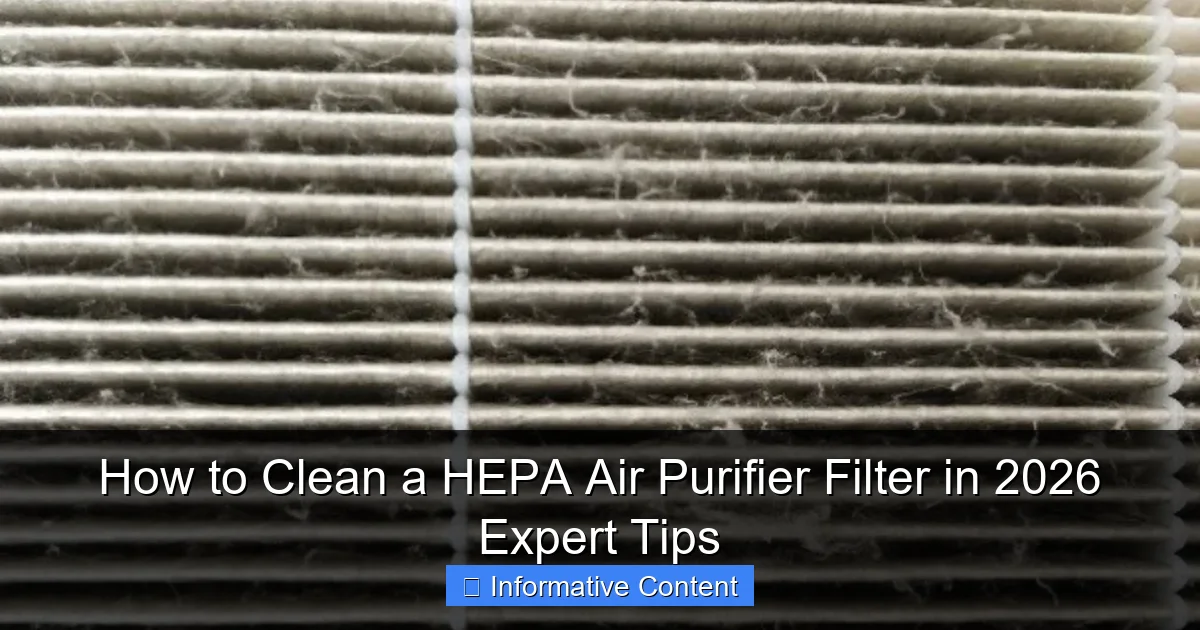
Featured image for how to clean a hepa air purifier filter
Image source: honeywellstore.com
Never wash a true HEPA filter—doing so can damage its delicate fibers and reduce efficiency. Instead, gently vacuum the surface every 2–3 months to remove dust and debris, and always follow your manufacturer’s guidelines for maintenance. For washable pre-filters, rinse with cool water and let air dry completely before reinserting. Regular cleaning extends filter life and keeps your air purifier running at peak performance in 2026 and beyond.
Key Takeaways
- Turn off and unplug the purifier before cleaning for safety.
- Vacuum gently to remove surface dust without damaging HEPA fibers.
- Never use water on true HEPA filters—it ruins their efficiency.
- Replace if torn or after 6–12 months of regular use.
- Check pre-filters monthly and rinse or replace as needed.
- Follow manufacturer instructions for model-specific cleaning guidelines.
📑 Table of Contents
- Why Keeping Your HEPA Filter Clean Matters More Than Ever
- Understanding Your HEPA Filter: The Basics You Need to Know
- Step-by-Step Guide: How to Clean a HEPA Air Purifier Filter Safely
- Common Mistakes to Avoid (And How to Fix Them)
- Special Cases: Cleaning HEPA Filters in Challenging Environments
- When to Replace Instead of Clean: The Data-Backed Decision
- Final Thoughts: Clean Smart, Breathe Easy
Why Keeping Your HEPA Filter Clean Matters More Than Ever
Let me tell you about the time my allergies went from “mildly annoying” to “I can’t breathe” in just a week. I was sneezing nonstop, my eyes were itchy, and I blamed it on seasonal pollen. But then I noticed my air purifier had been running nonstop for months. When I finally checked the HEPA filter, I was shocked. It was clogged with dust, pet hair, and what looked like a small ecosystem of mold. That’s when I learned the hard way: cleaning your HEPA air purifier filter isn’t optional—it’s essential.
In 2026, air quality continues to be a top concern for households. Whether you live in a city with high pollution, have pets, or just want to reduce allergens, your HEPA filter is your first line of defense. But if it’s not maintained, it becomes less effective and can even release trapped particles back into the air. Cleaning it properly ensures your purifier works as intended, extends its lifespan, and saves you money on replacements. The good news? With the right steps, it’s easier than you think. Let’s dive into how to clean a HEPA air purifier filter the right way—no guesswork, just expert-backed tips.
Understanding Your HEPA Filter: The Basics You Need to Know
What Exactly Is a HEPA Filter?
HEPA stands for High-Efficiency Particulate Air. These filters are designed to trap at least 99.97% of particles as small as 0.3 microns—think dust, pollen, mold spores, pet dander, and even some bacteria. They’re made from a dense mesh of fine fibers, usually glass or synthetic materials, which physically block and capture pollutants as air passes through.
Visual guide about how to clean a hepa air purifier filter
Image source: smartairfilters.com
Here’s the catch: HEPA filters are not like reusable coffee filters you can just rinse and reuse. They’re precision-engineered, and improper cleaning can damage the fibers, reducing efficiency. That’s why knowing your filter type is the first step to cleaning it safely.
HEPA vs. “HEPA-Like” Filters: Don’t Get Fooled
Not all “HEPA” filters are created equal. Some brands label their filters as “HEPA-type” or “HEPA-style,” which means they don’t meet the official HEPA standard. These often have lower efficiency (around 95–99%) and are usually cheaper to replace. But they’re also less effective at capturing tiny particles. Always check your purifier’s manual or the filter packaging to confirm it’s a true HEPA filter (look for “True HEPA” or “H13/H14 grade”).
Pro tip: If your purifier has a “washable pre-filter,” that’s not the HEPA filter. The pre-filter catches larger debris like hair and lint and can be cleaned, but the HEPA layer behind it is different. Don’t confuse the two!
How Often Should You Clean It?
Most manufacturers recommend replacing HEPA filters every 6–12 months, depending on usage and air quality. But cleaning can help extend that timeline—especially if you live in a dusty or pet-heavy home. As a rule of thumb:
- Light use (e.g., bedroom, low pollution): Clean every 3–4 months
- Moderate use (e.g., living room, pet owners): Clean every 2–3 months
- Heavy use (e.g., allergy sufferers, urban areas): Clean every 1–2 months
Signs it’s time to clean or replace: reduced airflow, louder fan noise, persistent odors, or worsening allergies.
Step-by-Step Guide: How to Clean a HEPA Air Purifier Filter Safely
Step 1: Power Down and Unplug
Before doing anything, turn off and unplug your air purifier. This isn’t just about safety—it prevents dust from being pulled into the motor or electronics while you’re working. Trust me, I learned this the hard way when I accidentally turned mine on mid-clean and sent a dust cloud across the room. Not fun.
Step 2: Remove the Filter Carefully
Open the purifier’s cover (usually with clips, screws, or a simple latch). Gently pull out the filter. Most HEPA filters are framed in cardboard or plastic, so avoid squeezing or bending them. If your purifier has multiple filters (e.g., pre-filter + HEPA + carbon), remove them in layers.
Example: My Winix 5500-2 has a magnetic door and a pre-filter that slides out easily. The HEPA filter sits behind it and lifts out with two finger grips. No tools needed—just be gentle.
Step 3: Assess the Filter’s Condition
Hold the filter up to a light. If you can’t see light passing through the fibers, it’s likely too clogged to clean effectively. Also, check for:
- Visible mold or mildew (dark spots or fuzzy growth)
- Tears or holes in the filter material
- Strong odors that don’t dissipate after cleaning
If you see any of these, it’s time to replace the filter. Cleaning won’t fix damage or mold—in fact, it could spread spores into your home.
Step 4: Clean the Pre-Filter (If Present)
Many purifiers have a washable pre-filter that captures large particles. This is the only part you can safely rinse. Here’s how:
- Rinse under lukewarm water (never hot—it can warp the mesh)
- Use a soft brush (like a toothbrush) to gently scrub away stuck-on debris
- Let it air dry completely (24–48 hours) before reinstalling
Tip: I keep a spare pre-filter so I can swap them out while one dries. No downtime for my purifier!
Step 5: Clean the HEPA Filter (Dry Methods Only)
Never use water or cleaning solutions on the HEPA layer. The fibers are delicate, and moisture can ruin them. Instead, try these dry methods:
- Vacuum with a brush attachment: Use your vacuum’s upholstery or crevice tool to gently suction dust from both sides. Hold the nozzle close but don’t press hard—you don’t want to compress the fibers.
- Compressed air (canned or electric duster): Blow air through the filter from the clean side (the side facing the fan) to push debris out. Hold the can upright to avoid moisture.
- Soft brush: A clean, dry paintbrush or makeup brush works great for light dusting.
Pro tip: I do this outside or over a trash can to avoid scattering dust. One time, I vacuumed my filter indoors and ended up with a dust storm on my hardwood floors. Lesson learned!
Step 6: Reinstall and Test
Once the pre-filter is dry (if applicable), reassemble your purifier in reverse order. Make sure the HEPA filter is seated properly—misalignment can cause air leaks. Plug it back in, turn it on, and listen for unusual noises. If the fan sounds labored, double-check that the filter isn’t blocking airflow.
Common Mistakes to Avoid (And How to Fix Them)
Mistake 1: Washing the HEPA Filter
I’ve seen this one too often. Someone sees “cleanable” on the box and assumes it includes the HEPA layer. Big mistake. Water breaks down the fiber matrix, reduces efficiency, and can cause mold growth. Once a HEPA filter gets wet, it’s usually a goner.
What to do instead: Stick to dry methods. If you accidentally get it wet, let it air dry completely (48+ hours), but expect reduced performance. Consider it a replacement candidate.
Mistake 2: Using Harsh Tools or Chemicals
Steel wool, abrasive sponges, or household cleaners (like Windex) can damage the filter. Even vinegar or baking soda sprays are risky—residue can clog the fibers.
What to do instead: Use only soft brushes, vacuum attachments, or compressed air. If you must clean the frame (cardboard or plastic), wipe it with a dry microfiber cloth.
Mistake 3: Skipping the Pre-Filter
The pre-filter is your HEPA’s first line of defense. If it’s clogged, the HEPA layer gets overwhelmed faster. I once ignored my pre-filter for months and had to replace the HEPA after just 4 months—costing me $80 instead of $40.
What to do instead: Clean the pre-filter every 1–2 months (or as recommended). It’s cheap insurance for your HEPA.
Mistake 4: Not Tracking Replacement Dates
Even with cleaning, HEPA filters degrade over time. The fibers can break down, and trapped particles can off-gas odors. If you’re not tracking usage, you might be breathing in stale, contaminated air.
What to do instead: Write the installation date on the filter frame with a marker, or set a reminder on your phone. I use a Google Calendar alert every 6 months to check mine.
Special Cases: Cleaning HEPA Filters in Challenging Environments
Homes with Pets
Pet hair and dander are HEPA filters’ kryptonite. If you have cats or dogs, you’ll clean more often—and more thoroughly.
- Tip 1: Use a vacuum with a pet hair attachment. My Dyson’s mini motorized tool works wonders for pulling hair off the filter.
- Tip 2: Groom your pets regularly. Less shedding = less filter clogging.
- Tip 3: Consider a purifier with a dedicated pet mode or odor filter (like carbon) to reduce strain on the HEPA.
Smoke or Wildfire-Prone Areas
Smoke particles are tiny and sticky. They can coat the filter and reduce airflow quickly. In 2020, when wildfires hit my area, I cleaned my filter weekly.
- Tip 1: Use a vacuum with a HEPA-rated bag or canister to avoid re-circulating smoke particles.
- Tip 2: If the filter smells like smoke, it’s likely saturated. Replace it sooner than usual.
- Tip 3: Run your purifier on high during smoke events, but monitor the filter closely.
Allergy or Asthma Sufferers
If you or a family member has severe allergies, you need a pristine filter. Even minor clogs can worsen symptoms.
- Tip 1: Clean every 1–2 months, and consider using a filter with an antimicrobial coating (e.g., some Blueair models).
- Tip 2: Keep a spare HEPA filter on hand for quick swaps during flare-ups.
- Tip 3: Pair your purifier with an air quality monitor (like Awair) to track particle levels.
When to Replace Instead of Clean: The Data-Backed Decision
Cleaning can extend your HEPA filter’s life, but there’s a limit. Here’s a table to help you decide when to clean vs. replace:
| Factor | Clean It | Replace It |
|---|---|---|
| Age | Under 6 months | Over 12 months (or 6 months in heavy use) |
| Visible Damage | No tears or holes | Tears, holes, or frayed edges |
| Mold/Mildew | None | Any visible growth |
| Airflow | Normal fan speed | Fan runs louder or slower |
| Odors | No persistent smells | Musty, smoky, or chemical smells |
| Efficiency Test | Light passes through fibers | No light visible; filter looks solid |
Real-world example: My HEPA filter lasted 8 months with bi-weekly cleaning. But when I noticed my allergies worsening and the fan straining, I checked the table—and sure enough, the airflow was reduced. Time to replace it. The new filter made a huge difference.
Final Thoughts: Clean Smart, Breathe Easy
Cleaning your HEPA air purifier filter isn’t glamorous, but it’s one of the simplest ways to protect your health and your wallet. A well-maintained filter keeps your purifier running efficiently, reduces energy use, and ensures you’re actually breathing cleaner air—not just circulating dust.
Remember: cleaning is maintenance, not a cure-all. Use dry methods, respect the filter’s limits, and don’t hesitate to replace it when needed. And if you’re ever in doubt, consult your purifier’s manual. Every model is different, and the manufacturer knows best.
As we head into 2026, air quality challenges aren’t going away. But with a little effort—and the tips you’ve learned here—you can keep your home’s air fresh, clean, and safe. Your lungs (and your wallet) will thank you. Now go give that filter some love—you’ve got this!
Frequently Asked Questions
How do you clean a HEPA air purifier filter without damaging it?
To safely clean a HEPA air purifier filter, gently vacuum the surface using a soft brush attachment to remove dust and debris. Avoid washing or rinsing the filter, as moisture can damage the delicate fibers and reduce efficiency.
Can you wash a HEPA filter in water?
No, most true HEPA filters are not washable and should never be cleaned with water. Wetting the filter can cause mold growth and permanently impair its ability to capture particles.
How often should you clean a HEPA air purifier filter?
It’s recommended to clean the pre-filter every 2–4 weeks and inspect the HEPA filter every 3–6 months, depending on usage and air quality. Regular maintenance helps maintain optimal performance.
What tools do you need to clean a HEPA filter?
You only need a vacuum cleaner with a soft brush attachment to gently remove surface dust. For deeper maintenance, a microfiber cloth can help clean the outer housing without disturbing the filter.
Is it possible to clean and reuse a HEPA filter?
Some HEPA filters are labeled as washable or reusable, but true HEPA filters typically are not. Always check your manufacturer’s guidelines before attempting to clean a HEPA air purifier filter.
What happens if you don’t clean your HEPA filter regularly?
Neglecting filter maintenance can reduce airflow, strain the motor, and decrease air purification efficiency. Over time, a clogged filter may also lead to unpleasant odors and poor indoor air quality.