
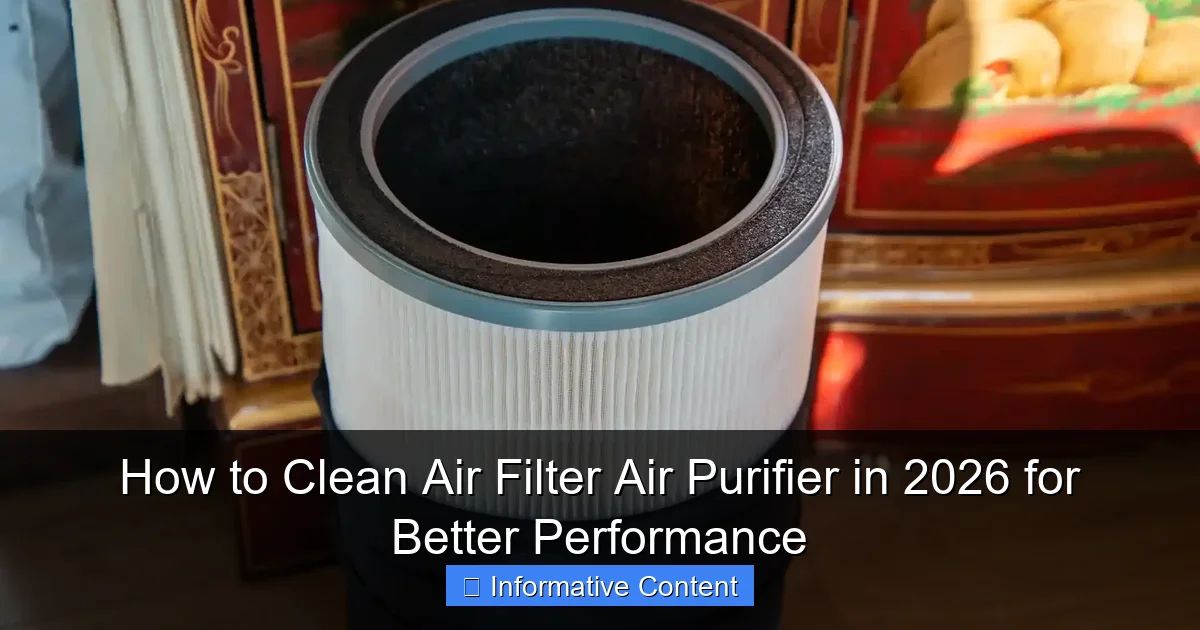
Featured image for how to clean air filter air purifier
Image source: spadonehome.com
Cleaning your air purifier’s filter regularly is the most effective way to maintain peak performance and ensure cleaner, healthier air in 2026. Follow manufacturer guidelines to safely remove, vacuum, or wash reusable filters, and replace disposable ones on schedule to prevent airflow blockage and reduced efficiency. A well-maintained filter not only extends your purifier’s lifespan but also maximizes its ability to capture dust, allergens, and pollutants effectively.
Key Takeaways
- Turn off and unplug your air purifier before cleaning to ensure safety.
- Vacuum pre-filters monthly to remove large debris and extend filter life.
- Wash HEPA filters gently with water only if manufacturer-approved; air dry fully.
- Replace filters every 6–12 months or as recommended for optimal performance.
- Clean the purifier housing with a damp cloth to prevent dust buildup.
- Check indicator lights to track filter status and maintenance needs accurately.
📑 Table of Contents
- Why Cleaning Your Air Purifier Filter Matters More Than You Think
- Understanding Your Air Purifier’s Filter Types (And Why It Matters)
- Step-by-Step Guide: How to Clean Air Filter Air Purifier (Room-by-Room)
- When to Replace vs. Clean: A Data-Backed Approach
- Pro Tips to Maximize Air Purifier Performance in 2026
- Common Mistakes (And How to Avoid Them)
- Final Thoughts: Breathe Easy in 2026
Why Cleaning Your Air Purifier Filter Matters More Than You Think
Let me tell you a quick story. A few years ago, I bought a sleek, high-end air purifier for my apartment. It promised “hospital-grade filtration” and “99.97% allergen removal.” At first, it worked like a charm. My allergies improved, and the air felt noticeably fresher. But after about four months, I started sneezing again. The purifier was still running, but it just wasn’t helping. I assumed it was broken—until I opened the back and saw the filter. It was black. Not gray. Not dusty. Black. Like a sponge that had soaked up every speck of city grime, pet dander, and cooking smoke. That’s when I learned: an air purifier is only as good as its filter, and a dirty filter isn’t just ineffective—it can actually worsen air quality.
By 2026, air purifiers have become essential in homes, offices, and even cars. With rising concerns about wildfire smoke, indoor pollutants, and post-pandemic air quality, people are relying on these devices more than ever. But here’s the catch: cleaning your air filter air purifier isn’t just about maintenance—it’s about performance, efficiency, and even cost savings. A clogged filter forces the motor to work harder, increases energy use, and shortens the lifespan of the unit. In this guide, I’ll walk you through exactly how to clean air filter air purifier systems—whether you have a HEPA, carbon, or hybrid model—so you can breathe easier and keep your machine running like new.
Understanding Your Air Purifier’s Filter Types (And Why It Matters)
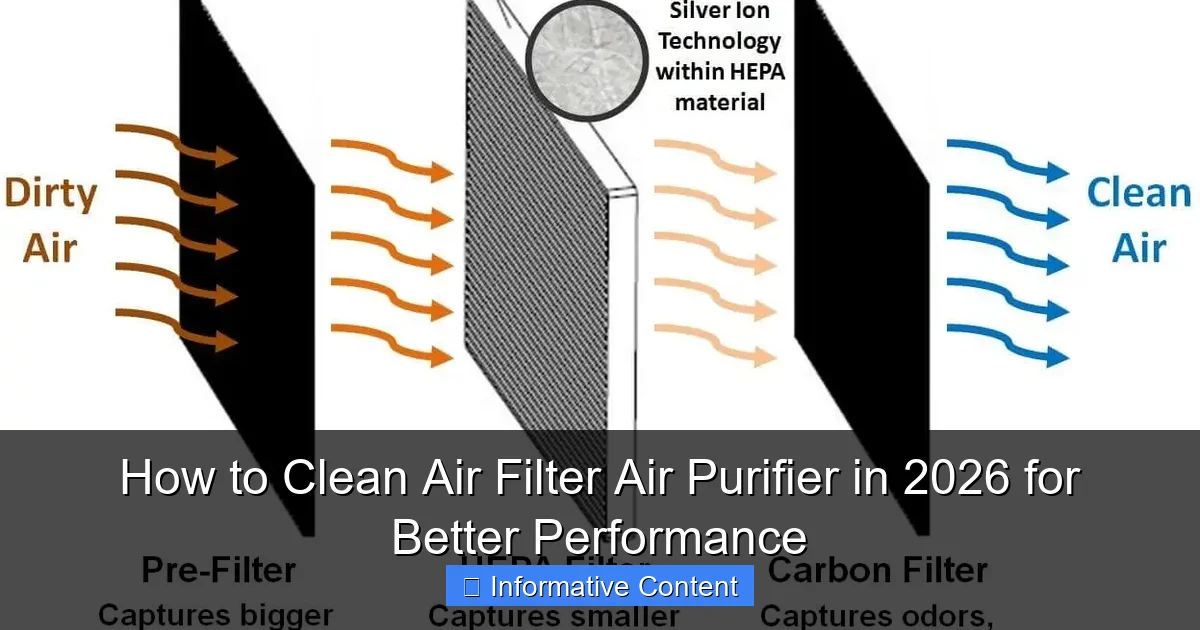
Before you even touch your purifier, it’s crucial to know what kind of filters it uses. Not all filters are created equal, and cleaning methods vary dramatically. Think of it like laundry: you wouldn’t wash a silk blouse the same way you’d scrub a denim jacket.
Visual guide about how to clean air filter air purifier
Image source: pickhvac.com
1. Pre-Filters: The First Line of Defense
Most air purifiers have a pre-filter—a thin, mesh-like screen that catches large particles like pet hair, dust bunnies, and lint. This filter is usually the easiest to clean and should be checked monthly. I once ignored mine for six months, and when I finally pulled it out, a small dust bunny actually fell out and rolled across the floor. Not a proud moment, but a great reminder: pre-filters are your first line of defense.
- Cleaning method: Vacuum with a brush attachment or rinse under lukewarm water. Let it air dry completely before reinstalling.
- Frequency: Every 2–4 weeks, depending on usage.
- Tip: If your pre-filter looks like a furry animal, it’s time to clean it—even if the manual says “every month.”
2. HEPA Filters: The Gold Standard (But Not Always Washable)
HEPA (High-Efficiency Particulate Air) filters trap 99.97% of particles as small as 0.3 microns—think pollen, mold spores, and even some bacteria. But here’s the big myth: most HEPA filters are NOT washable. Washing them can damage the delicate fiber structure, reducing efficiency or even creating gaps that let pollutants through.
- Cleaning method: Lightly vacuum the surface with a soft brush attachment. Do not use water.
- Replacement: Every 6–12 months, depending on usage and air quality.
- Exception: Some brands (like Winix and Levoit) offer “washable HEPA” filters. Check your manual. If it’s washable, rinse gently and air dry for 24+ hours.
3. Activated Carbon Filters: The Odor and VOC Removers
Carbon filters absorb gases, odors, and volatile organic compounds (VOCs) from cooking, cleaning products, or off-gassing furniture. They look like a mesh with black granules or a solid carbon panel. Unlike HEPA, carbon filters can be cleaned—but with caution.
- Cleaning method: Vacuum the surface. For deeper cleaning, place in direct sunlight for 2–3 hours. UV light helps “recharge” the carbon by releasing trapped molecules.
- Replacement: Every 3–6 months. Once saturated, they can emit odors instead of absorbing them.
- Tip: If your purifier smells like last week’s curry, the carbon filter is likely spent.
4. Hybrid and Electrostatic Filters: The Special Cases
Some purifiers use electrostatic filters (which attract particles with static charge) or hybrid systems (e.g., HEPA + carbon + ionizer). These often have washable components.
- Electrostatic: Rinse with water, dry thoroughly. Avoid soap unless specified.
- Hybrid: Follow manufacturer instructions. Never submerge electronic parts.
- Warning: Ionizers and UV-C lights (common in 2026 models) don’t need cleaning but should be checked for dust buildup on bulbs or plates.
Step-by-Step Guide: How to Clean Air Filter Air Purifier (Room-by-Room)
Now that you know your filter types, let’s get into the nitty-gritty. Cleaning your air purifier isn’t a one-size-fits-all process. The method depends on your model, room type, and how often you use it. Below are step-by-step instructions tailored to common scenarios.
Step 1: Turn Off and Unplug (Safety First!)
Always unplug your purifier before cleaning. I learned this the hard way when my finger accidentally brushed the fan blade while wiping the exterior. Ouch. Even if it’s “off,” internal capacitors can hold a charge. Give it 10 minutes after unplugging before opening.
Step 2: Remove Filters in the Right Order
Most purifiers have a front or side panel. Open it and remove filters in the order they were installed. This ensures you don’t mix them up. Label them with tape if needed (e.g., “Pre-Filter – Top,” “HEPA – Middle”).
- Example: My Coway Airmega has a magnetic front cover. I slide it up, then lift out the pre-filter, HEPA, and carbon in that order.
- Tip: Take a photo of the filter layout before removing anything. It’ll save time during reinstallation.
Step 3: Clean Based on Filter Type (Room-Specific Tips)
Living Room (High Dust + Pet Hair)
If your purifier’s in a living room with pets, expect a lot of fur and dander. I have two cats, so my pre-filter gets cleaned weekly.
- Pre-filter: Vacuum with a pet hair attachment. If it’s caked, rinse under water. I use a kitchen sink sprayer for stubborn spots.
- HEPA: Gently vacuum both sides. Avoid pressing hard—you’ll compress the fibers.
- Carbon: Vacuum + sunlight recharge. My cats love sitting near the purifier, so odors build up fast.
Kitchen (Cooking Smoke + Grease)
Grease from frying can coat filters, especially pre-filters. I once found my pre-filter greasy after making bacon—yikes.
- Pre-filter: Wash with mild dish soap and warm water. Rinse thoroughly. Grease can trap odors.
- Carbon: Sunlight recharge is a must. Cooking smells linger, so replace carbon every 3 months.
- Tip: Run your purifier on high for 10 minutes after cooking to capture lingering particles.
Bedroom (Allergens + Nighttime Use)
Bedrooms are often the most sensitive. Dust mites, pollen, and fabric fibers accumulate here.
- Pre-filter: Vacuum monthly. I use a handheld vacuum with a soft brush.
- HEPA: Vacuum every 2 months. In allergy season, I do it monthly.
- Carbon: Replace every 6 months. Bedroom odors (from laundry, shoes) are subtle but persistent.
Step 4: Wipe Down the Interior and Exterior
While the filters dry, clean the purifier’s body. Use a microfiber cloth dampened with water or a 50/50 mix of water and white vinegar. Never use abrasive cleaners or ammonia—they can damage plastic or leave harmful fumes.
- Fan blades: Use a cotton swab dipped in vinegar to remove dust buildup. This improves airflow.
- Air inlets/outlets: Vacuum with a brush attachment. Clogged vents reduce efficiency by up to 30%.
- Tip: For purifiers with sensors (common in 2026 models), wipe the sensor window with a dry cloth. Dust can trigger false “high pollution” alerts.
When to Replace vs. Clean: A Data-Backed Approach
Cleaning isn’t always the answer. Some filters degrade over time, and cleaning can’t restore their original performance. How do you know when to clean vs. replace? Let’s look at the data.
The 6-Month Rule: When Filters Lose Efficiency
According to the EPA, a typical HEPA filter loses about 10–15% of its efficiency after 6 months of continuous use in a standard home. After 12 months, that number jumps to 25–30%. Carbon filters degrade faster due to saturation.
- HEPA: Clean monthly (vacuum), replace every 6–12 months.
- Carbon: Clean monthly (vacuum + sunlight), replace every 3–6 months.
- Pre-filter: Clean every 2–4 weeks, replace every 6–12 months (if torn or warped).
Signs It’s Time to Replace (Not Clean)
Don’t waste time cleaning a filter that’s past its prime. Look for these red flags:
- Visible damage: Tears, holes, or crumbling material (especially in HEPA).
- Persistent odors: If your purifier smells after cleaning, the carbon is saturated.
- Reduced airflow: The fan runs loudly or the air output feels weaker.
- Allergy flare-ups: If you’re sneezing again despite cleaning, the filter isn’t trapping particles.
Data Table: Filter Lifespan and Replacement Guide
| Filter Type | Cleaning Frequency | Replacement Frequency | Average Cost (USD) | Best For |
|---|---|---|---|---|
| Pre-Filter | Every 2–4 weeks | Every 6–12 months | $10–$25 | Large particles (dust, hair) |
| HEPA (Non-Washable) | Monthly (vacuum) | Every 6–12 months | $30–$80 | Allergens, mold, bacteria |
| HEPA (Washable) | Every 2–4 weeks (rinse) | Every 12–18 months | $40–$100 | Low-maintenance homes |
| Activated Carbon | Monthly (vacuum + sunlight) | Every 3–6 months | $20–$60 | Odors, VOCs, smoke |
| Electrostatic | Every 2–4 weeks (rinse) | Every 12–24 months | $15–$40 | Allergen-prone areas |
Pro Tips to Maximize Air Purifier Performance in 2026
Cleaning is just one part of the puzzle. To get the most from your air purifier in 2026, try these pro strategies I’ve learned from HVAC experts and air quality researchers.
1. Use a Filter Replacement Reminder System
I used to forget when to replace filters—until I set up a phone calendar reminder. But in 2026, many purifiers (like the Dyson Purifier Humidify+Cool) have built-in filter life monitors. They use sensors to track airflow and particle levels, then alert you when replacement is due. If your model doesn’t have this, use an app like “Filter Replacement Tracker” or a simple sticky note on the unit.
2. Optimize Placement for Maximum Airflow
Your purifier’s location affects its efficiency. I once placed mine in a corner, thinking it’d look neat. Big mistake. Corners restrict airflow. Now I follow the “2-foot rule”:
- Keep the purifier at least 2 feet away from walls, furniture, and curtains.
- Place it in the room’s center or near a high-traffic area (e.g., beside your bed or sofa).
- For multi-room homes, consider a portable purifier or a whole-house system.
3. Run It 24/7 (But Smartly)
Air quality isn’t static. Pollen peaks in the morning. Cooking smoke rises at dinner. To stay ahead, run your purifier continuously—but use smart scheduling.
- Use the purifier’s app (if available) to set schedules. I run mine on high from 6–9 PM (cooking time) and low at night.
- Pair it with a smart plug for voice control (e.g., “Alexa, turn on the purifier”).
- Energy tip: Modern purifiers (2026 models) are energy-efficient. Mine uses less power than a light bulb.
4. Pair with Other Air Quality Tools
No purifier is perfect. I use mine alongside:
- Humidifier: Keeps humidity at 40–50%, which reduces airborne particles.
- Ventilation: Open windows when outdoor air quality is good (check apps like IQAir).
- Houseplants: Peace lilies and snake plants help with VOCs (though they’re no match for a good purifier).
Common Mistakes (And How to Avoid Them)
Even seasoned users make blunders. Here are the top mistakes I’ve made—and how to avoid them.
1. Using Soap on HEPA Filters
Soap leaves a residue that clogs HEPA fibers. I once used dish soap on a “washable HEPA” filter. It never worked right again. Never use soap on HEPA filters unless the manual explicitly says to. Rinse with water only.
2. Reinstalling Damp Filters
Moisture breeds mold and bacteria. Always let filters air dry for at least 4–6 hours (24 hours for carbon filters). I keep a spare set so I can swap them while drying.
3. Ignoring the User Manual
Every purifier is different. My friend cleaned her Levoit’s ionizer with a wet cloth—and fried the circuit board. Always check the manual first. If it says “do not submerge,” don’t submerge.
4. Overlooking the Air Quality Sensor
Many 2026 purifiers have built-in sensors. Dust on the sensor can cause false readings. Wipe it monthly with a dry cloth.
5. Cleaning During High Pollution Events
If there’s a wildfire or high pollen count, clean your filters before or after the event. Cleaning during a pollution spike can release trapped particles into the air.
Final Thoughts: Breathe Easy in 2026
Cleaning your air filter air purifier isn’t just a chore—it’s a commitment to better health. I’ve seen the difference in my own home: fewer allergy days, better sleep, and peace of mind knowing the air I breathe is truly clean. In 2026, with smarter purifiers and rising air quality concerns, staying proactive is more important than ever.
Remember, a clean filter is a happy filter. It runs quieter, uses less energy, and lasts longer. Whether you’re battling pet dander, cooking smells, or seasonal pollen, a well-maintained purifier is your best ally. So set those reminders, follow the steps above, and don’t wait until your filter turns black (like mine once did). Your lungs—and your purifier—will thank you.
And hey, if you’re ever in doubt, just think: would you drink from a dirty water filter? Of course not. Treat your air the same way. After all, you’re breathing it every single second.
Frequently Asked Questions
How often should I clean my air purifier’s air filter in 2026?
For optimal performance, clean your air filter every 2–4 weeks if you use the purifier daily, especially in high-pollution areas. Check the manufacturer’s guidelines for model-specific recommendations, as newer 2026 models may have smart sensors to alert you when cleaning is due.
Can I wash a HEPA filter in my air purifier?
Most HEPA filters are not washable and should be gently vacuumed or replaced when clogged. However, some 2026 air purifiers feature washable pre-filters—always confirm your model’s specs before cleaning to avoid damage.
What’s the best way to clean an air filter air purifier without damaging it?
Use a soft brush or vacuum with a low-suction setting to remove dust from the filter surface. Avoid water or harsh chemicals unless the manual explicitly states the filter is washable—most are not.
How do I know when my air purifier’s filter needs cleaning?
Look for reduced airflow, louder operation, or a lingering odor when the unit runs. Many 2026 models include filter-life indicators, but visual inspection (dark, clogged mesh) is a reliable backup method.
Can cleaning my air purifier’s filter improve its performance?
Yes! A clean air filter ensures maximum airflow and filtration efficiency, helping your purifier capture allergens, smoke, and particles effectively. Regular cleaning can also extend the lifespan of your device.
Do I need special tools to clean an air filter air purifier?
No—most cleaning requires just a soft brush, microfiber cloth, or vacuum attachment. For stubborn debris, use compressed air (held 6+ inches from the filter). Always power off the purifier first.